Create Projects (API)
POST https://api.fireraven.ai/public/fireguard/v1/project
Instead of creating a project manually in the interface, you can create projects programmatically through this API endpoint. A project is required before you can create conversations and apply guardrails. You can attach policies, security guardrail settings, and optionally topics (for topic relevance monitoring in the product). After you have a project_id, use the Guardrails API for conversation, conversation_copilot (Microsoft Copilot), input_guardrails, and output_guardrails.
If you still use the legacy path POST .../public/fireguard/v1.1/project, the API responds with HTTP 307 to /public/fireguard/v1/project (same method). For input guardrails with optional images, see Input Guardrails (v1).
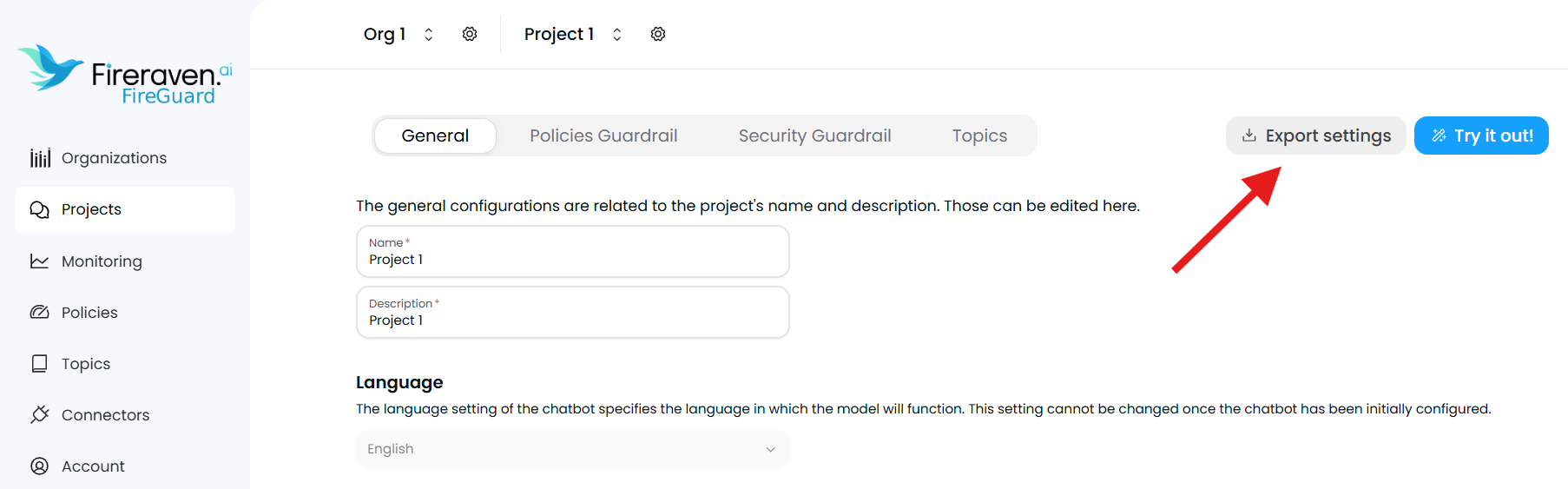
To get the IDs of policies and topics (and a ready-to-use request template), generate a template from an existing project. In the FireGuard platform, go to your project Project Settings page and click Export settings. The exported template uses the correct structure for policies and topics and can be used as a base for the API request body.
Header parameter
X-Api-Key string (required)
Your API key for authentication. Send it in the X-Api-Key header.
Body parameters
name string (required)
The name of the project.
description string (required)
A description of the project.
organizationId string (required)
The ID of the organization that will own the project.
policies array (optional)
A list of policy configurations. Each item is an object with:
metricIdstring — The policy (metric) ID.blockInputboolean — Whether to apply this policy to input guardrails.blockOutputboolean — Whether to apply this policy to output guardrails.
Leave empty if you will configure policies later (e.g. via the project settings).
topics array (optional)
A list of topic configurations for topic relevance analysis (monitoring/metrics in FireGuard). Each item is an object with:
topicIdstring — The topic ID.enableInputboolean — Whether to run topic analysis on user input for this topic.enableOutputboolean — Whether to run topic analysis on assistant output for this topic.
Leave empty if you will configure topics later.
securityGuardrails object (required)
Security guardrail settings for the project.
securityGuardrailBlockInputboolean — Whether to block input when a security guardrail is triggered. Default:true.securityGuardrailBlockOutputboolean — Whether to block output when a security guardrail is triggered. Default:true.securityGuardrailDetectionThresholdnumber — Detection threshold (e.g.1). Default:1.
Returns
On success (HTTP 200), the response contains the created project's public ID.
projectId string
The unique identifier of the created project. Use this as project_id when creating conversations.
Example
Request body (JSON)
{
  "name": "My FireGuard Project",
  "description": "Project for LLM guardrails",
  "organizationId": "00000000-0000-0000-0000-000000000000",
  "policies": [
    {
      "metricId": "00000000-0000-0000-0000-000000000000",
      "blockInput": true,
      "blockOutput": true
    }
  ],
  "securityGuardrails": {
    "securityGuardrailBlockInput": true,
    "securityGuardrailBlockOutput": true,
    "securityGuardrailDetectionThreshold": 0.5
  },
  "topics": [
    {
      "topicId": "00000000-0000-0000-0000-000000000000",
      "enableInput": true,
      "enableOutput": true
    }
  ]
}
cURL
curl -X 'POST' \
  'https://api.fireraven.ai/public/fireguard/v1/project' \
  -H 'X-Api-Key: <your-apikey>' \
  -H 'Content-Type: application/json' \
  -d '{
  "name": "My FireGuard Project",
  "description": "Project for LLM guardrails",
  "organizationId": "00000000-0000-0000-0000-000000000000",
  "policies": [
    {
      "metricId": "00000000-0000-0000-0000-000000000000",
      "blockInput": true,
      "blockOutput": true
    }
  ],
  "securityGuardrails": {
    "securityGuardrailBlockInput": true,
    "securityGuardrailBlockOutput": true,
    "securityGuardrailDetectionThreshold": 0.5
  },
  "topics": [
    {
      "topicId": "00000000-0000-0000-0000-000000000000",
      "enableInput": true,
      "enableOutput": true
    }
  ]
}'
{
  "projectId": "00000000-0000-0000-0000-000000000000"
}